Node Mapping
Purpose
NodeIDs are the individual values the connector reads from the endpoint and maps to tags the app understands (machine status, errors, warnings, counters, process metrics). Node mapping is done per connection in the detail view.
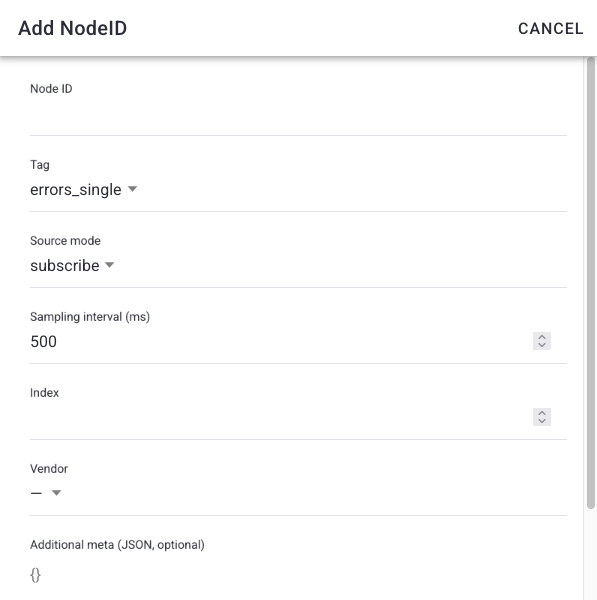
Node fields
- Node ID — the OPC UA node identifier on the server.
- Tag — what the value represents in the app (status, error, warning, counter, metric, …). Since v9.39.0, this also includes root-cause error and root-cause warning tags, for a node that reports the currently active root cause (with a configurable "inactive" value for when no error/warning is active).
- Source mode — how the value is obtained (subscription/monitored vs. polled).
- Sampling interval — how often the server samples the value (ms).
- Poll interval — how often the connector polls the value, for polled nodes (ms).
- Index / Multiplier — array index and scaling factor applied to the raw value.
- Template — apply a predefined node template to speed up repetitive mappings.
Steps
- Open a connection from OPC UA Connections.
- In the Nodes card, select Add node (or edit an existing row).
- Enter the Node ID and choose the tag; set source mode, intervals, index, and multiplier as needed.
- Save. Use the value inspector to confirm a current value is read.
- Repeat for every value the machine should report.
What users see
A nodes table listing each mapped NodeID with its tag and current value, plus Add node and per-row edit actions. A value modal shows the latest raw and interpreted value; rows missing a value are flagged Missing current value.

Troubleshooting
- A node shows Missing current value -> Wrong Node ID, or the server isn't publishing it -> Verify the Node ID and source mode, then test the node -> Check the Logs.
- Value is scaled wrong -> Multiplier/index mismatch -> Adjust Multiplier and Index and re-test.