Add a Connection
Purpose
Create a new OPC UA connection by pairing a machine with an endpoint. NodeIDs are added afterwards in the connection detail view.
Steps
- In OPC UA Connections, select Add connection.
- Choose the creation flow:
- Manual creation — the standard wizard (recommended).
- Harro Höfliger default — import a vendor CSV/XML export (site-specific; see Import).
- Choose the machine:
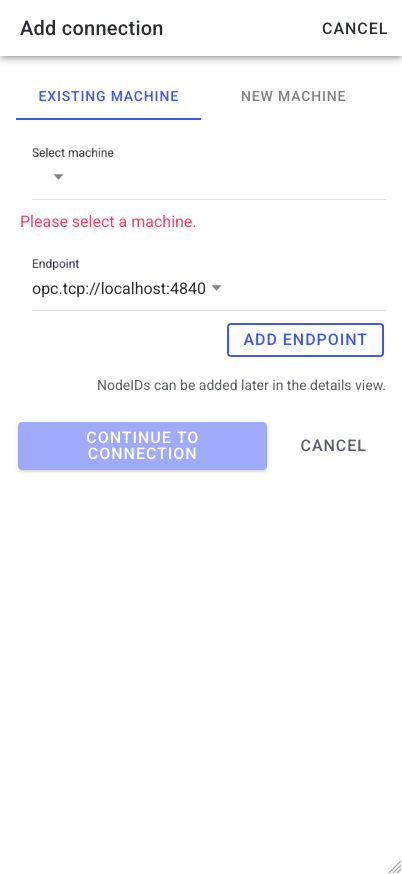
- Existing machine — select a machine that has no connection yet, or
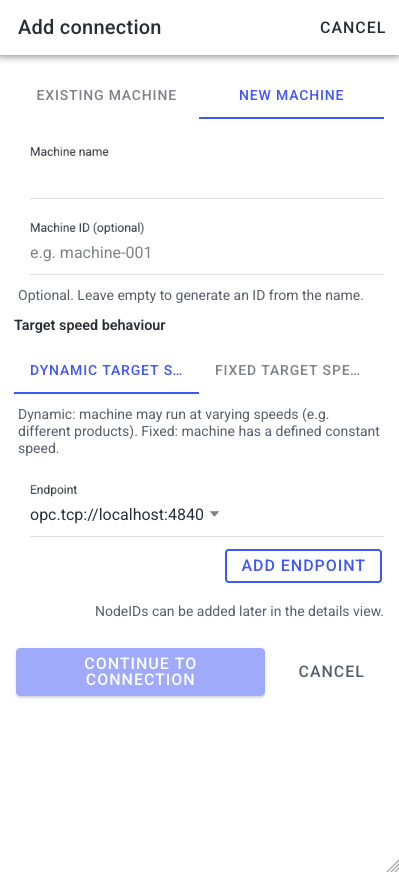
- New machine — enter a Machine name (min. 2 characters) and an optional Machine ID (letters, numbers, dashes, underscores; leave empty to generate one from the name).
- For a new machine, set the Target speed behaviour:
- Dynamic target speed — the machine may run at varying speeds (e.g. different products).
- Fixed target speed — enter a Fixed target speed in PPM (parts per minute; e.g. 120 = two parts per second).
- Add the Endpoint (URL and security). See Endpoints.
- Select Continue to connection. The connection draft is created — add NodeIDs next.
What users see
A wizard modal with the machine selection (existing/new), the target-speed option, and an endpoint sub-form. A hint reminds you that NodeIDs can be added later in the details view.
The same wizard when picking an existing machine:
Troubleshooting
- A connection for this machine already exists -> The machine is already connected -> Edit the existing connection instead of creating a new one.
- The machine dropdown is empty -> Every machine already has a connection -> Create a New machine or free up an existing one.